
Optimizing The Agent's Environment
How changes to documentation, tool design, and application architecture can improve coding agent performance across development workflows

Coding agents are now a standard part of development workflows. Product builders are using agents to varying degrees, but the scope of tasks agents perform is generally expanding. Agents are now writing code, conducting code reviews, testing applications, identifying vulnerabilities, fixing problems, and even managing other agents working on distinct development tasks.
As agents work more broadly across our systems, we have to examine whether they can find what they need, understand what needs to be done, and reliably execute the actions required to complete a task. When we strategically design the environment agents operate in, we help them operate as effectively as possible.
I have previously written about harness engineering, agentic UX, and spec-driven development. As I have been building things with coding agents, I have noticed that the core ideas from these three topics intersect in some interesting ways.
I believe that optimizing the agent’s environment may allow us to passively enhance its performance, and it will likely become more important as a way to enable it to act more autonomously.
Why Does The Agent’s “Environment” Matter
We have to design environments that allow agents to do reliable work. The agent’s “environment” is everything it interacts with when performing a task: the codebase, documentation, tools, APIs, internal systems, and external resources. It must provide the scaffolding agents need to perform actions, interpret outcomes, and orchestrate workflows. As more development work is done by agents, I find the “environment” framing useful as a way to explore broader strategies to enhance the effectiveness of coding agents.
Our most difficult challenges now center on designing environments, feedback loops, and control systems that help agents accomplish our goal: build and maintain complex, reliable software at scale.
— OpenAI, Harness Engineering: leveraging Codex in an agent-first world
Most applications are built for human developers who can work with incomplete context. Good developers won’t immediately assume that seemingly redundant code needs to be removed. It may have been left there for good reasons, even if these aren’t documented anywhere. They could verify the reason by inspecting the code, making an educated guess, or asking colleagues. An agent will often just assume this “issue” needs to be fixed, causing more problems later on. From the agent’s perspective, anything outside its accessible context effectively doesn’t exist. This context issue needs to be addressed at the system level, not just the session level.
Developers at OpenAI recently shared how they built their coding agent, Codex. They described the concept of agent legibility, which refers to the agent’s ability to navigate the code and reason directly from the repository itself. Differences in legibility are one reason why agents need more guidance when working within some applications than others. Certain applications have cleaner, more understandable code, good documentation, and a logical architecture. These qualities make these environments easier to work in. However, developers are generally much better at handling ambiguity than agents, so what seems like a “well-designed” application to them may be confusing for an agent.
Enhancing agent legibility means making everything the agent interacts with “make sense” to it. This requires making changes to the agent’s harness and, to some degree, the application design itself. The goal is to give agents richer context around development tasks. Developers can’t assume agents will just get better at “figuring things out” as models improve. Models fundamentally operate on predictions based on available data. If the right details are not exposed to the model at the right moments, it will miss them.
We should aim to make our system easier for the agent to navigate and harder for it to misinterpret. The easier it is for agents to operate within our system, the more we can benefit from their autonomy with fewer issues along the way.
Optimizing harnesses can significantly enhance agent performance. If you’re interested in exploring them, check out this post 👇🏾

If you’re interested in specific tactics for using coding agents, check out this post 👇🏾

How We Can Enhance The Environment Agents Operate In
We can evaluate our environment across three dimensions:
Discoverability → Can the agent find what it needs for the task?
Interpretability → Can the agent understand what it needs to do?
Execution → Can the agent reliably perform the necessary actions?
The following strategies can enhance agent performance by improving the environment across one or more of these dimensions.
Documentation: Can the agent find the technical documentation it needs?
Enhances: Discoverability, Interpretability
Documentation is a major mechanism for passively delivering context to an agent. Docs are referenced across nearly every task the agent performs, so they have an outsized effect on overall performance. Crystal clear documentation helps them perform tasks consistently by providing useful development context, such as architectural design principles, tool and API usage, error handling, technical constraints, and future implementations. These details may be necessary when working on issues, improvements, or optimizations. It’s highly inefficient to make the agent “figure out” these details repeatedly.
Content: Does each doc contain all the context the agent needs?
Simply creating documentation is not enough. Agents can’t work with incomplete or ambiguous documentation the way developers can. Every doc needs to be well-structured (e.g., tables, lists, schemas), follow a consistent pattern, and be kept up-to-date. Docs should reveal the rationale behind technical decisions. The “why” behind a piece of code may change how the agent approaches a problem. For example, API documentation should be optimized to answer the major questions around each endpoint: What is this for? How should the request be structured? What are the required and optional input parameters? How is the response structured? What errors could occur?
Different documents should contain different types of context. For coding agents, an AGENTS.md file will typically define the role, scope, constraints, and rules, directing it to core files, development guidelines, testing instructions, and other information referenced across sessions. Each doc should be comprehensive to give the agent clear direction and boundaries when writing code. When docs are designed for agent readability, the agent is more likely to recognize which details must shape its output.
When the agent has to keep inferring details, it’s more likely to run into problems that could have been avoided. For example, an ARCHITECTURE.md file may explain that we always need fallbacks when using certain problematic APIs. Without this context, the agent may assume the API always works when building new features, creating issues for users. Docs must be designed so agents can reliably retrieve, parse, and use information when necessary. The fewer details it has to infer or guess, the lower the chance of an unexpected or unwanted outcome.
Structure: Can the agent understand how to navigate the docs?
Once you have good documentation, you need to ensure the agent knows where to look. Docs must be organized in a logical pattern with a clear entry point. The AGENTS.md file should contain a high-level directory pointing the agent toward specific files or folders. It should be structured as a table of contents, not an exhaustive instruction manual. It should contain global rules and requirements, but direct the agent to specific files for more context. This makes its context window leaner, keeping it focused on the task. When AGENTS.md contains too much information, the agent is likely to miss key constraints or optimize for the wrong ones.
The agent’s knowledge base should live in a structured docs/ directory, catalogued and indexed. A structured index file (index.md) in each subfolder tells the agent what each file within it contains, so it can quickly locate relevant files. Without it, the agent has to infer what exists and where, consuming context and introducing errors. For example, a folder with execution plans (docs/exec-plans) helps the agent track active and completed plans, and even known technical debt. When the documentation structure is designed to progressively disclose information, agents always have a small, stable entry point they can reference when generating code, rather than having to review multiple irrelevant docs up front.
Example: In-repository knowledge store layout (adapted from OpenAI Codex)
AGENTS.md
docs/
├── exec-plans/
│   ├── active/
│   ├── completed/
│   └── tech-debt-tracker.md
├── product-specs/
│   ├── index.md
│   ├── new-user-onboarding.md
│   └── ...
├── ARCHITECTURE.md
├── DESIGN.md
├── RELIABILITY.md
└── SECURITY.md
Format: Are docs accessible in agent-friendly formats?
If relevant application docs exist outside your repo (e.g., in internal wikis or knowledge bases, documentation sites), they should be available in simple text formats (e.g., .md, .txt). These consume far less context than other formats (e.g., PDFs, Word docs). We can still keep these versions for our own convenience, but the agent should not default to them. When the agent has to read docs from web pages, it has to parse through extra information (HTML markup, scripts) before reaching the actual content, filling its context window with irrelevant details that may confuse or distract it.
We can implement something called content negotiation to serve pages as markdown instead of giving the agent the full webpage. These markdown versions can be significantly smaller than the HTML versions. Many companies have realized that enhancing agent accessibility can help their own agents as well as their users’ agents. For example, Cash App and Stripe now provide markdown versions of their docs (accessed by adding .md to the page URLs). We can apply this same strategy to make our docs agent-friendly. Making information accessible in the right format helps the agent navigate, read, and understand docs more reliably.
Tool Selection: Can the agent find the tools it needs?
Enhances: Discoverability, Execution
The agent can access tools from its harness, the application, or from external systems. However, they need guidance to effectively navigate their selection of tools. They can use incorrect or irrelevant tools, and even if they select the right ones, use them poorly, wasting tokens, driving up token spend, and reducing performance. Directing the agent toward the right tools is critical for ensuring that they operate effectively and efficiently.
Scope: Does the agent have the right tools?
More tools don’t always lead to better results. Each additional tool increases the possibility of potential issues (e.g., reasoning failures, incorrect tool calls, bugs). However, we can increase the surface area over which agents can be effective by equipping them with the right tools. Tools can consolidate discrete functionality (e.g., function calls, API requests, individual steps), enhancing the agent’s output. For example, a single tool could consolidate automated tests, the failure log retrieval, and code coverage checks, letting the agent check whether a change is safe to ship with a single call.
However, each tool should still have a clear, distinct purpose. When too much functionality is crammed into a single tool, the agent is more likely to use it incorrectly. For example, if the testing tool also has to run scans for vulnerabilities, audit dependencies, and lint the codebase, the agent may get overwhelmed, leading to incorrect tool calls. Multiple tools with overlapping functionality can cause the agent to fail to choose the right one for the job. Therefore, we have to carefully design each tool and consider which ones the agent really needs.
Names & Descriptions: Can the agent navigate the available tools?
When tool names are vague or overlapping, agents will not choose correctly. Giving tools clear, descriptive names and grouping related tools under common prefixes helps the agent differentiate between them. For example, if the agent has to search through multiple databases, assign tool names by service (e.g., notion_db_search, jira_db_search) or specific resource (e.g., notion_db_search_projects, notion_db_search_customers). While good tool names help the agent quickly identify potentially relevant tools, the tool description tells it when and how to use them.
Useful tool descriptions give the agent sufficient context on each tool’s purpose, along with its specific inputs and outputs, so it can determine whether the tool will be helpful for the target task. For example, if the agent needs to run an analysis, the analysis tool description should clarify usage instructions so the agent can provide information in the right format and properly process the outputs. When the agent has a full list of tools with explicit names and descriptions, it’s more likely to apply its available tools effectively.
Workflows: Can the agent effectively execute and orchestrate tasks?
Enhances: Execution
Agents need to interact with several internal systems when executing tasks. They must use functions, tools, and APIs across multi-step operations. They need to understand how to perform these actions correctly. They also need to track where they are in a workflow, recover from interruptions, and chain operations together. The system must be designed to communicate the context required to execute and orchestrate tasks across development workflows.
Requests/Responses: Can the agent provide the correct inputs and correctly interpret the outputs?
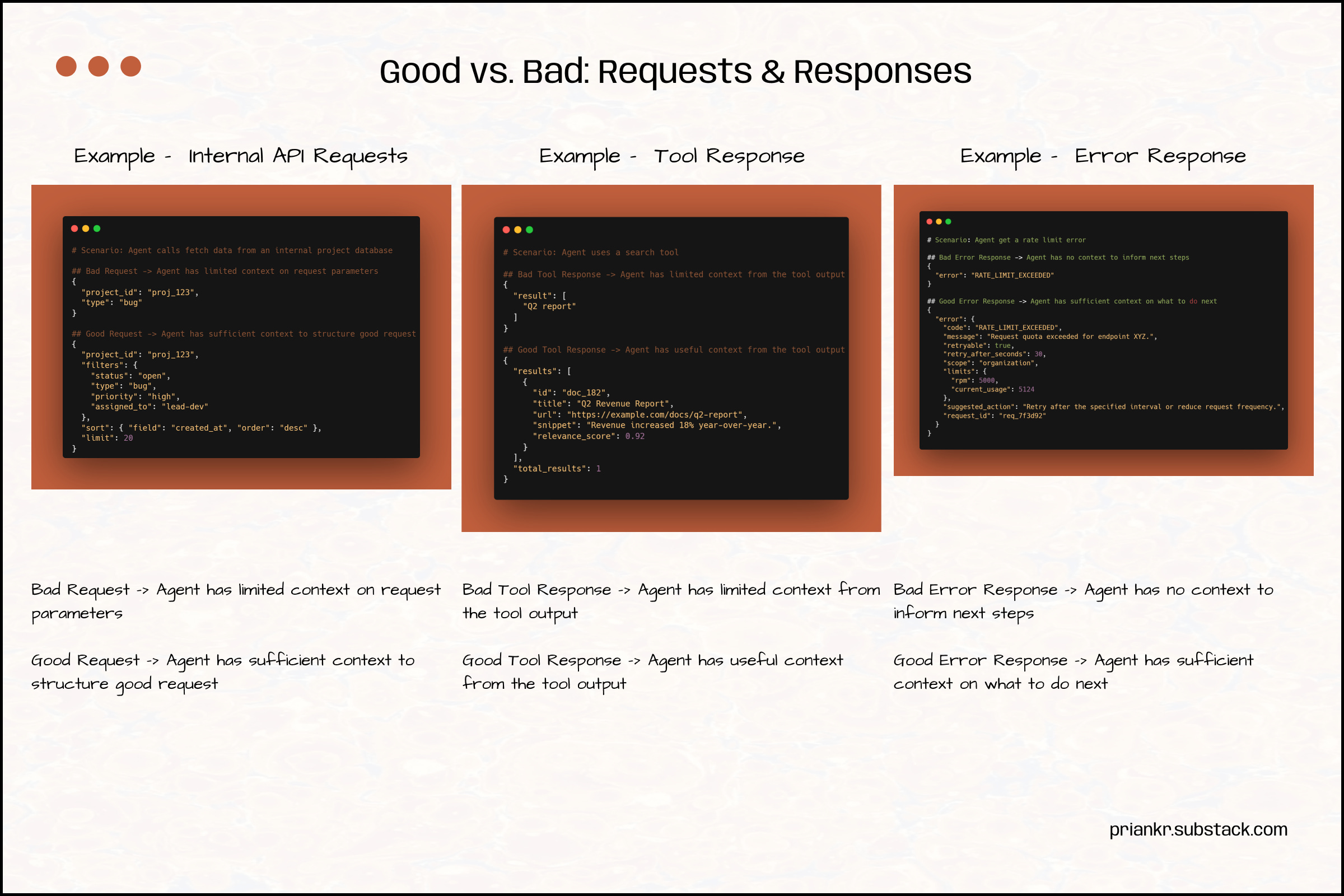
When triggering an action, the agent needs specific execution context. For example, when calling an endpoint, it should know how to structure its request accurately. Well-defined request schemas give the agent unambiguous instructions on what to send, reducing the chance of a bad input that produces unhelpful or unpredictable responses. When defining request parameters (e.g., in tool descriptions or docs), we need to clarify what’s required and optional, and what outputs are produced when different parameters are passed.
Internal responses must also not force the agent to infer meaning (preconditions, postconditions, errors, etc.). For example, if the response from using a tool or internal endpoint is poorly structured, there’s a higher risk of the agent misinterpreting what it should do next. The response should give the agent high signal information, so it can evaluate the output. Similarly, when things go wrong, a generic error response may not tell the agent how to respond. It needs more context on what specifically failed, so it can recover or retry.
The agent needs a clear understanding of the inputs and outputs of its actions to appropriately adjust its strategy. Requests and responses both need structure. This gives the underlying model clear directions on what information to send (e.g., when calling functions, tools, and endpoints) and what information to expect in return. The agent is more likely to execute internal operations correctly when the system has well-structured request/response schemas. When building new functionality, it’s also helpful to consider whether we’re designing effective schemas that will assist the agent with future fixes, improvements, or optimizations.
Retries: Can the agent retry actions when necessary without causing issues?
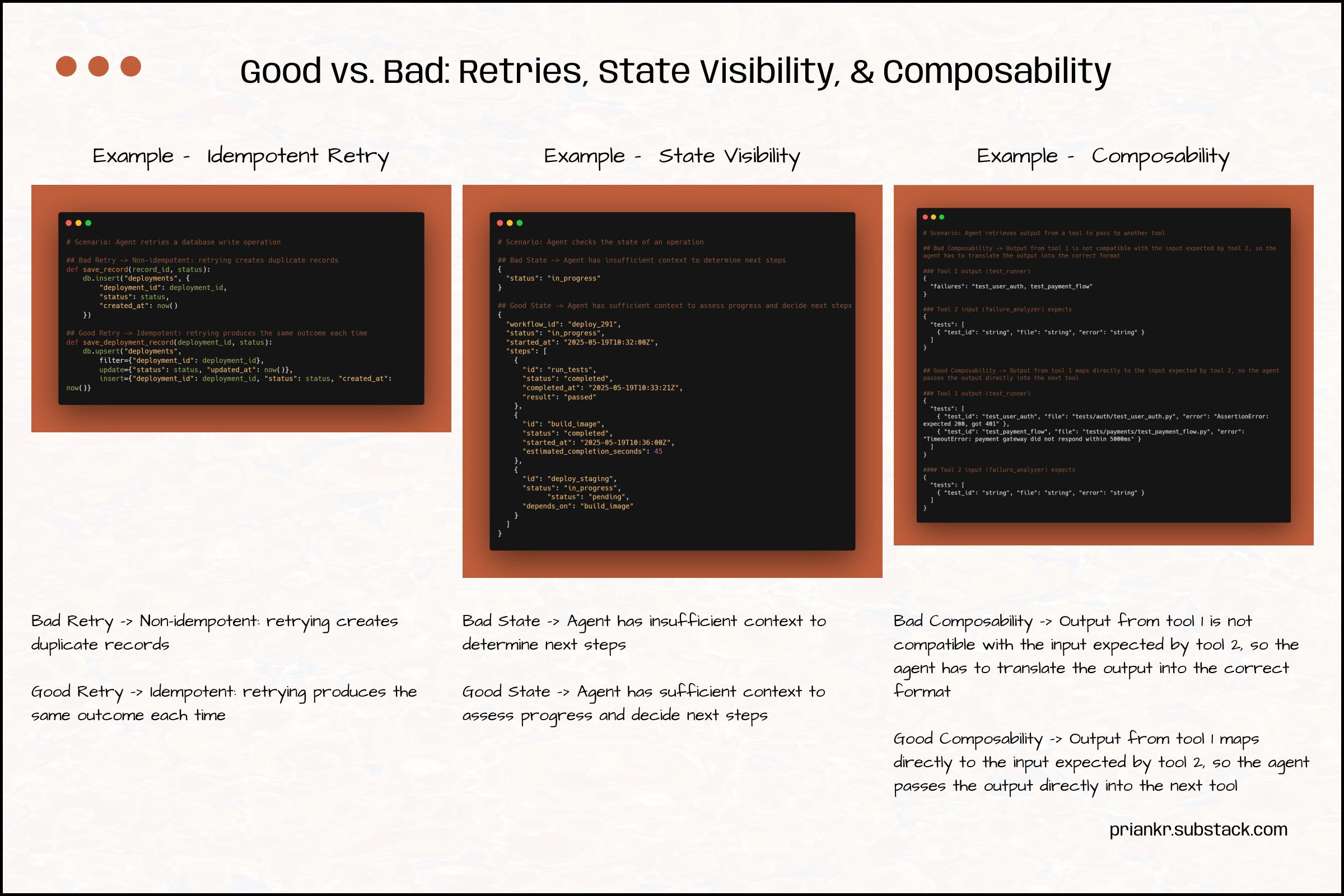
When using tools, agents may need to retry the same operation multiple times (e.g., to verify outcomes, check statuses, or confirm completion). The agent could encounter timeouts, errors, or network failures, preventing it from completing an action on the first attempt. The tools must be designed to accommodate this scenario. Certain operations have to be designed so the agent can repeat them without causing an unwanted outcome. For example, if the agent must use the same tool twice because an issue occurred, the second action must not trigger a destructive change. When a command produces the same outcome each time it is executed, it’s called an idempotent command. These are critical for agents to validate whether they succeeded, without creating unnecessary side effects.
State Visibility: Can the agent verify the current state?
Agents need to know what has happened, what is pending, and what has failed to effectively orchestrate multi-step workflows and manage long-horizon tasks. Without this information, the agent can’t check progress, resume after interruption, or decide whether to wait or abort. They need state visibility to verify the current status of workflows, operations, or resources. They should be able to check in, confirm progress, and resume ongoing tasks. For example, coding agents often perform tasks in parallel, so they need to keep track of everything they are doing to avoid overlooking critical details (e.g., incomplete tasks, failed automated tests, build issues). The state should reveal rich context, not just results. On long-running tasks, intermediate states should also be exposed so the agent can decide whether to wait, abort, or redirect.
Composability: Can the agent effectively combine operations in multi-step workflows?
Composability ensures agents can chain multiple operations together by structuring outputs from each step so they can be fed directly into downstream steps. For example, the agent may use a data retrieval tool before using an analysis tool. If the output from the first tool is not in the right format for the second, the agent has to convert it, consuming more tokens, increasing latency, and introducing unpredictability. We have to design internal operations to minimize the translation work needed between steps. Without composability, agents have to continuously reinterpret outputs, rewrite schemas, and reconcile mismatches. These issues degrade reliability across long workflows. Therefore, it’s a first-class feature for agentic systems.
Conclusion
Coding assistance has transformed product development in some fundamental ways. However, despite their “intelligence,” coding agents still need good context to operate reliably. A system designed for human developers who can tolerate ambiguity will be harder for agents to navigate. We can’t solve this by just giving them better instructions within a session. We have to make our systems overall more legible, so agents can work within our applications more effectively.
Every decision about how to structure documentation, tools, and the application itself influences the agent’s reasoning and behavior. When the agent’s “environment” is designed to amplify its strengths and accommodate its weaknesses, we can get better results from coding agents. It can locate the necessary information, understand the goals, requirements, and constraints, and verify that it is executing actions correctly, making it more likely to produce better outputs.
Thanks For Reading
If you haven’t already, please consider subscribing and sharing this newsletter with a friend. I hope you have a great week!
References
Priank’s Newsletter
Anthropic | Writing effective tools for agents — with agents
Takafumi Endo | AI as Operator: Designing Systems for AI Readability
MindStudio | How to Build an Agent-Native Product: Lessons from OpenClaw, Hermes, and Codex
OpenAI | Harness engineering: leveraging Codex in an agent-first world
Vercel | Making agent-friendly pages with content negotiation