
How To Generate Better Code With AI
10 tactics for getting better results with spec-driven development as a non-technical product manager

In my last post, I wrote about how PMs must now become true product builders by extending their reach into development work as AI reshapes how product teams operate. This post explores how non-technical PMs can actually use AI to code, based on insights from my personal experimentation and best practices from industry experts.
AI-coding assistance allows product managers to directly contribute to development. PMs can now build internal tools, implement feature additions, and fix bugs—tasks that previously required engineering time. They can’t architect complex systems or optimize mission-critical code, but they can meaningfully contribute to many development tasks. However, many PMs have realized that “vibe coding” doesn’t work when working with complex codebases.
Spec-driven development—creating detailed specifications to guide AI models —has emerged as a more effective strategy. But the results can vary depending on how it’s used. For non-technical PMs to get consistent results, they need specific tactics for managing AI coding workflows. Having extensively experimented with building with AI, I have identified 10 tactics that produce better results, no matter which AI coding tools you use.
What Is Spec-Driven Development And Why It’s Challenging
Spec-driven development involves creating technical specifications before generating any code and using these specs to guide AI coding assistants. Unlike ad-hoc prompting, specs provide comprehensive project context that an AI model can reference as it generates code. This approach retains the productivity benefits of AI generation while introducing more structure, planning, and verification to the code generation process.
Instead of writing code and then trying to retrofit understanding (or just hoping it works), the spec-first approach encodes intent clearly from the start. The AI’s output is judged against a known target.
— Addy Osmani, Engineering Leader at Google
Key terms to remember:
The product requirements describe what you want to build.
The spec provides a detailed description of what you plan to build.
The implementation plan provides a detailed description of how you will build it.
Why non-technical PMs struggle with spec-driven development
When I first tried this approach, I could build basic apps easily. But when I tried to add complex functionality (e.g., multi-step workflows, API integrations), I would always run into problems the model couldn’t reliably solve. It would cycle through failed approaches repeatedly. Even when building completely different apps, the same problems emerged once the complexity increased.
I realized that the problem was how I was using AI, not the model's capability. Getting good results with spec-driven development requires more than just writing detailed specs. You need specific tactics for managing AI coding workflows. Because, unlike engineers who will ask clarifying questions, flag vague requirements, and push back on infeasible requests, AI models will implement whatever you specify, even if it’s technically problematic. This means PMs must adapt their approach to compensate for this.
Through extensive trial and error, I identified tactics that noticeably improve code quality and the AI coding process. These have helped me establish a solid foundation before generating any code and allowed me to enhance how I create, manage, and understand AI-generated code, even when using different AI tools.
Here are the 10 tactics that helped me generate better code with AI.
You May Also Like: Why PMs Must Now Become True Product Builders
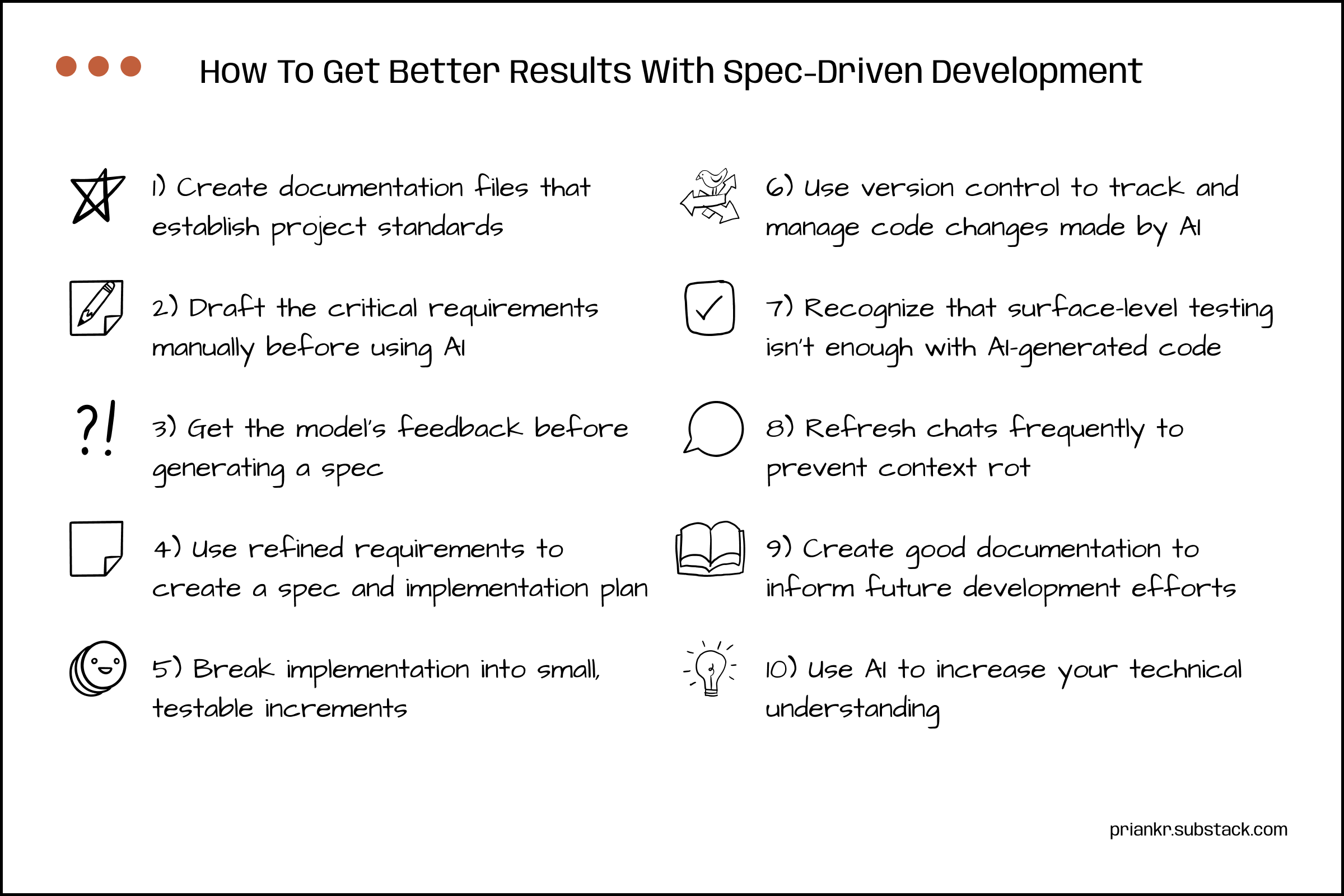
How To Get Better Results With Spec-Driven Development
1) Create documentation files that establish project standards
AI models perform best when given clear direction and boundaries. However, with ad-hoc instructions, the models can easily lose track of guidelines and produce inconsistent code (e.g., mixed naming conventions, error-handling strategies, and architectural patterns). When models lack clear guidance, they will optimize for completing the immediate task, ignoring the consequences of their messy code.
Non-technical PMs can manage this inconsistency through comprehensive project documentation. You can use AI to generate these files based on your goals and requirements, and then add them to your documentation folder. Standard conventions make the code more consistent and understandable, which is helpful when adding, modifying, or debugging code.
While there are many different types of helpful documentation, I have found these files to be for most development tasks:
AGENTS.md: Defines the role, scope, constraints, and rules for AI-coding assistants (in Claude Code, this file is called CLAUDE.md). It provides context on core files, development guidelines, testing instructions, and other information you want the agent to remember.
database.md: Documents the data model and persistence layer. It provides context on schemas, tables, relationships, migrations, database functions, and other relevant database details.
design.md: Describes the design system for the project. It provides context on the typography, color palette, component standards, and interaction patterns to ensure a consistent UI/UX.
errors.md: Catalogs known errors, failure modes, and edge cases. It provides context on critical bug fixes, error handling, and lessons learned during development.
These files help the model make consistent engineering decisions, without requiring you to repeat context in every prompt. These files can be referenced when needed (e.g., “Follow the design principles in design.md.”). You always add more files depending on your specific use case, but it’s essential to keep these files updated to ensure they reflect the current state of the codebase.
2) Draft the critical requirements manually before using AI
Many PMs now use AI to generate PRDs. However, when you use AI too early in the process, you miss the opportunity to think deeply about what you’re building. While AI lets you rapidly move from an initial concept to a finished artifact, it also changes how you explore ideas. You must do at least the first 20% of the work because the model just doesn’t have the same context as you do. You must give the model a highly-specific target to aim for by providing good initial context.
As you give ideas shape and form, you refine your understanding of what needs to be done. I find that taking the time to draft a rough PRD (without AI) helps me better understand the problem I am solving. I outline the problem, solution, and basic requirements, including details such as feature/product descriptions, expected UX, and simple mockups. The goal is to articulate all the critical details before handing it off to AI.
3) Get the model’s feedback before generating a spec
After drafting your PRD and refining it with AI, you could immediately have the model create a spec and implementation plan. However, getting the model’s feedback first is a great way to reveal weak reasoning, spot critical gaps, and stress-test assumptions. This only works if you use an AI tool that has access to your codebase (e.g., Claude Code, Codex, Cursor). The model needs to be able to search files and understand existing code to provide useful feedback on the implementation’s feasibility, specific changes required, and potential issues.
When reviewing and responding to the model’s feedback, it’s important to do the following:
Assess the plan.
Verify which parts of the codebase will be affected by the implementation (e.g., dependencies, conflicts) to flag potential issues that will need to be managed.
Determine the best way to structure development tasks (e.g., implementation phases/stages) to ensure that you can systematically test and validate changes.
Understand what needs to change.
Clarify details about what you are trying to build because models can easily misinterpret your intent and provide context on relevant future additions or changes to the app.
Ask for explanations on why certain recommendations have been made and what the tradeoffs of different choices are.
Explore alternative approaches that accomplish the same goals.
4) Use refined requirements to create a spec and implementation plan
Use the model’s feedback to refine product requirements. Once the model has addressed your specific concerns, ask it to generate the spec and implementation plan. Specify what to include and exclude. For non-technical PMs, this feedback process is especially critical because it reveals what technical details matter, so they can write better requirements in the future. Many AI-coding assistants now include a “planning” mode (e.g., Claude Code, Cursor) to assist with spec and implementation plan generation as well.
While this approach is not as “efficient” as just prompting the model with basic details and context files, you get better quality plans that reduces many post-implementation issues. Research on Cursor usage shows that planning in advance matters: while 61% of users start with code implementation requests, experienced developers typically plan first. This increases the likelihood of the generated code being aligned with their intent.
5) Break implementation into small, testable increments
Even when you have a solid plan, don’t try to build everything at once. Non-technical PMs often don’t realize the complexity of development tasks. For example, modifying a dashboard component might require updating multiple API calls, changing data transformations, and adjusting error handling. Each of these can fail independently. When the model makes multiple complex changes at once, there’s a higher risk of something going wrong.
You get better results when you break complex implementations into small, testable increments. This ensures that you can verify whether the current approach works and make changes if necessary. You should also instruct the model to provide explicit testing guidelines and include comprehensive logs (on the console, backend, etc.). When things break, share logs, error messages, and screenshots with the model. Since you can’t debug code yourself, this context is essential for the model to diagnose and fix issues.
6) Use version control to track and manage code changes made by AI
AI-generated code often breaks things unexpectedly. Git lets you “undo” changes by tracking every modification to your codebase. When something breaks after implementation, you can roll back to an earlier version. You don’t need to master git. You can let the model handle it for you. However, I do recommend learning the basic concepts (e.g., commits, rollbacks, branches). If you’re unsure why the model is running a git command, ask for an explanation.
Good version control habits are especially important when working with a production codebase. Since models often make multiple changes across multiple files, frequent commits help you narrow down which specific changes caused a failure. Models also write detailed commit messages that provide context on changes. This helps both you and the model understand previous technical decisions when diagnosing issues or reviewing earlier file versions.
7) Recognize that surface-level testing isn’t enough with AI-generated code
Most PMs conduct user acceptance testing (UAT) to validate whether the feature works as expected from a user perspective. When coding with AI, this surface-level testing isn’t enough because performance, security, and reliability issues are hard to spot in UATs. To address this, you should ask the model to specifically check for these issues, monitor error logs and warnings, and set up automated alerts to notify you preemptively.
When testing reveals obvious bugs, sometimes, telling the model that an issue exists is not enough. Models will jump to implementing fixes without properly diagnosing the root cause. This works for simple bugs but not for complex issues. If the model can’t solve the problem in the first few attempts, it likely has not actually identified the root cause. In these cases, you have to instruct it to investigate specific questions (e.g., why does this fail in some instances but not others?), examine why previous attempts failed, and develop a verification plan before trying to fix it.
8) Refresh chats frequently to prevent context rot
Long conversations with AI lead to context rot—where responses degrade as the context increases—that can steadily make the quality of AI-generated code worse. This happens because models have finite context windows. While they can handle massive amounts of data, they can struggle to recall the right details when dealing with substantial context. So, lengthy back-and-forth conversations should be avoided. This is most noticeable when fixing bugs. After multiple failed attempts, the model starts cycling through variations of previous failed approaches instead of trying fundamentally different solutions. The best option at this point is just to start a new chat.
Non-technical PMs often won’t notice degradation until it’s severe. So I find it’s best to proactively start new chats after each discrete task (e.g., generating a spec, getting feedback, implementing code, fixing bugs). Before switching to a new chat, ask the model to summarize key decisions and technical context. Include this summary in your new prompt. Remember that even brief conversations can require the models to track multiple files. When you start asking questions as well, the content window quickly starts expanding as the model reviews files to provide answers.
9) Create good documentation to inform future development efforts
Good documentation gives non-technical PMs context on why technical decisions were made. Beyond standard documentation (project standards, specs, implementation plans), when the model provides useful details (e.g., future architecture considerations, performance optimizations), save it somewhere you can reference later. This prevents useful insights from getting lost in chat threads.
Explicitly instruct the model what to document and where (e.g., “Document these architectural recommendations in docs/architecture.md”). Documentation also includes code comments (e.g., “Add a comment explaining why we chose this caching strategy.”). Good comments can really help you understand the code when you lack technical expertise. Include comment requirements in your project-wide standards (e.g., in AGENTS.md, CLAUDE.md) so the model follows them automatically.
10) Use AI to increase your technical understanding
Non-technical PMs need a solid technical foundation to precisely instruct models and effectively review their outputs. You only tell them what to do when you know what they should be doing. Fortunately, you can use the model itself to build this understanding. Use it to explore the codebase and ask questions: How is the codebase structured? How do specific sections of code work? Why have certain technical choices been made?
AI models actively reward existing top-tier software engineering practices. Greater technical understanding helps you spot problems earlier. For instance, when the model suggests an inefficient database query, or when its solution will create technical debt. PMs don’t need to become technical experts. But understanding fundamentals (data models, API interactions, common patterns) dramatically improves your ability code with AI. The more deeply you understand the process, the better code you can generate.
Conclusion
You need good workflows to produce good code with AI coding tools.
Models have technical knowledge but lack judgment. You have to establish effective workflows that guide the model toward good solutions. These tactics won’t make you a senior engineer overnight, but they will help you ship working code, debug issues, and collaborate more effectively with your engineering team.
When PMs understand AI’s capabilities and limitations, they can adapt their product development workflows accordingly. This technical fluency allows you to make better product decisions. As AI becomes more embedded in product development, the gap between PMs who can leverage it effectively and those who can’t will widen. Those who can become proficient at building with AI will ship faster, contribute more to execution, and accelerate development.
Thanks For Reading
If you haven’t already, please consider subscribing and sharing this newsletter with a friend. I hope you have a great week!
References
Priank’s Newsletter | As AI Accelerates Development, Craft Becomes The Differentiator, Building With AI, Giving AI Better Instructions, Partnering With Engineers, Why PMs Must Now Become True Product Builders
Addy Osmani | Vibe coding is not the same as AI-Assisted engineering
Databricks | Passing the Security Vibe Check: The Dangers of Vibe Coding